
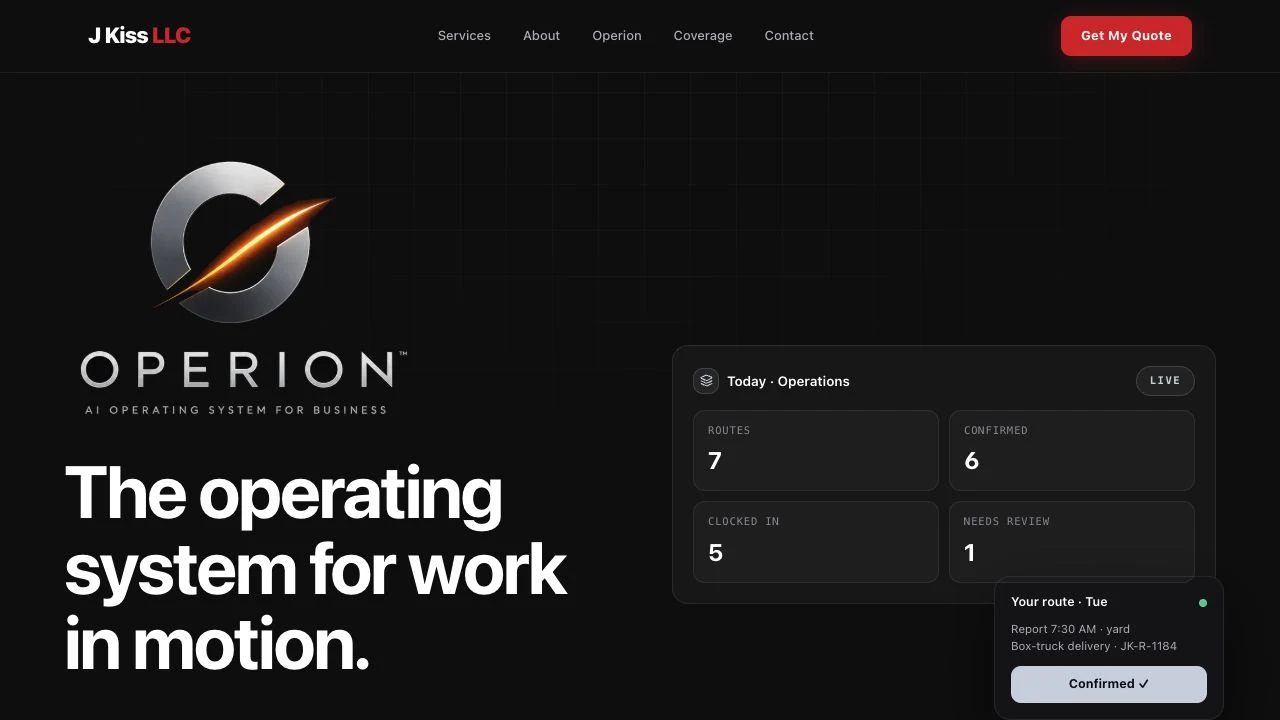
Operion
The operations platform built inside J Kiss LLC, with multi-company support designed in. J Kiss runs on the primary deployment; Supercharged Enterprise runs an adapted copy from its own codebase.
- My role
- Architect and developer.
- Built for
- Growing service companies
- Project type
- Multi-tenant operations platform
- Built with
- Next.js · TypeScript · Redis (Upstash) · Vercel Blob · Stripe · Twilio · Resend · Anthropic Claude
The story
What problem existed, and what we built.
The problem
Having built one company's operations system, the obvious question is whether a second company can run on it. The answer is only yes if each company's data is genuinely separate and each can be configured differently without forking the code.
What I built
Multi-company support built into the platform: tenant-aware data boundaries enforced in one place, per-company configuration for branding, pricing and integrations, and permissions checked on the server. It is built and tested, and switched off in production until a second company runs on the same deployment.
What it had to achieve
- Run more than one business on one codebase
- Keep tenants genuinely isolated, not just visually separated
- Make AI features cost-bounded and observable
See it working
One system, from the first quote to Friday payroll.
Every screen below is Operion running with realistic sample jobs, crew and pay. It's the same software J Kiss runs its business on every day, filled with invented data so no real customer or employee appears.
- server-side route handlers across operations, finance, claims and admin
- 300+
- permissions across admin, manager and crew
- 56
- automated test files guarding the logic
- 400+
- roles, enforced on the server
- 3
Command center
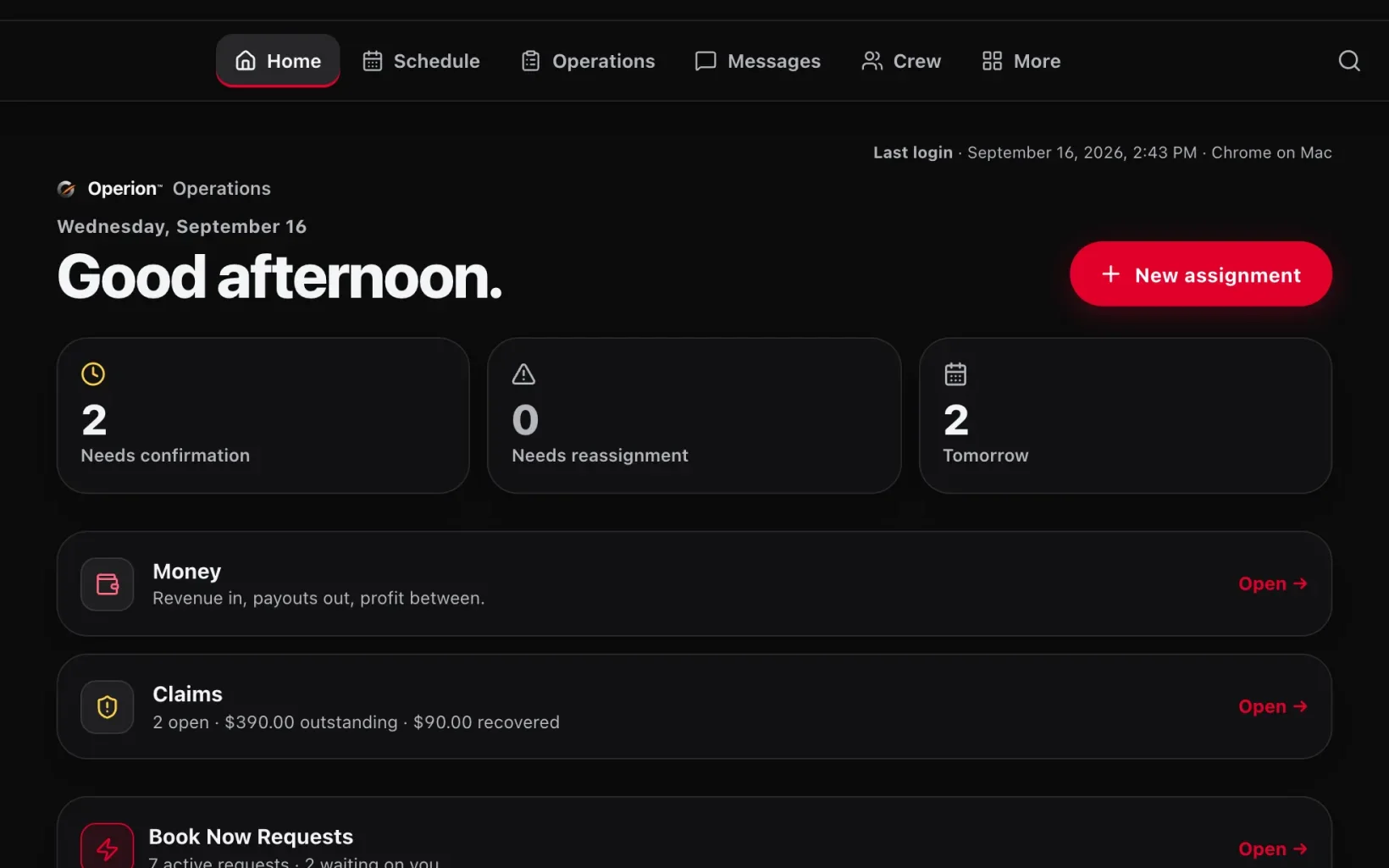
The whole day on one screen, before the first coffee.
The owner opens Operion to what actually needs a decision: jobs waiting on crew confirmation, work that needs reassigning, tomorrow's load, open claims and new booking requests. There's no digging through a group text to find out what's on fire.
- Needs confirmation, needs reassignment and tomorrow counts, calculated live from the schedule
- Book Now requests sorted by who's up next: needs you, with the customer, or won
- Navigation adjusts to each person's role, and every page checks permissions again on the server
Instant quotes
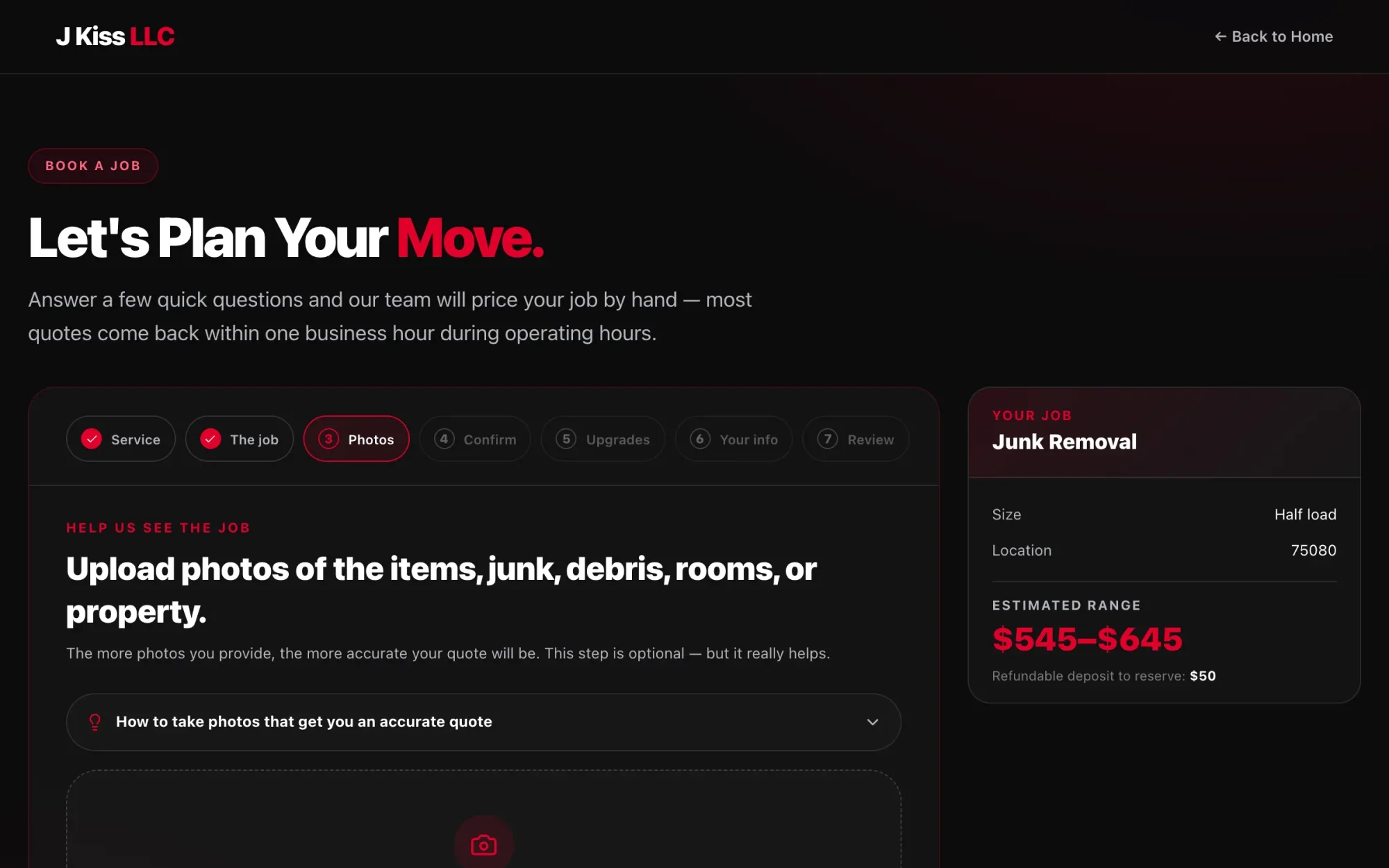
Customers see a price range while they're still interested.
A seven-step guided wizard asks plain questions about the job and shows an estimated range and the deposit to reserve, right beside the form. For junk removal, that range comes from the company's own disposal pricing, not an AI guess. The team still confirms the final price.
- Service, job details, photos, confirm, upgrades, contact info and review
- Up to eight photos per request, with guidance on shots that give an accurate quote
- An estimated range and refundable deposit shown next to the form
Scheduling
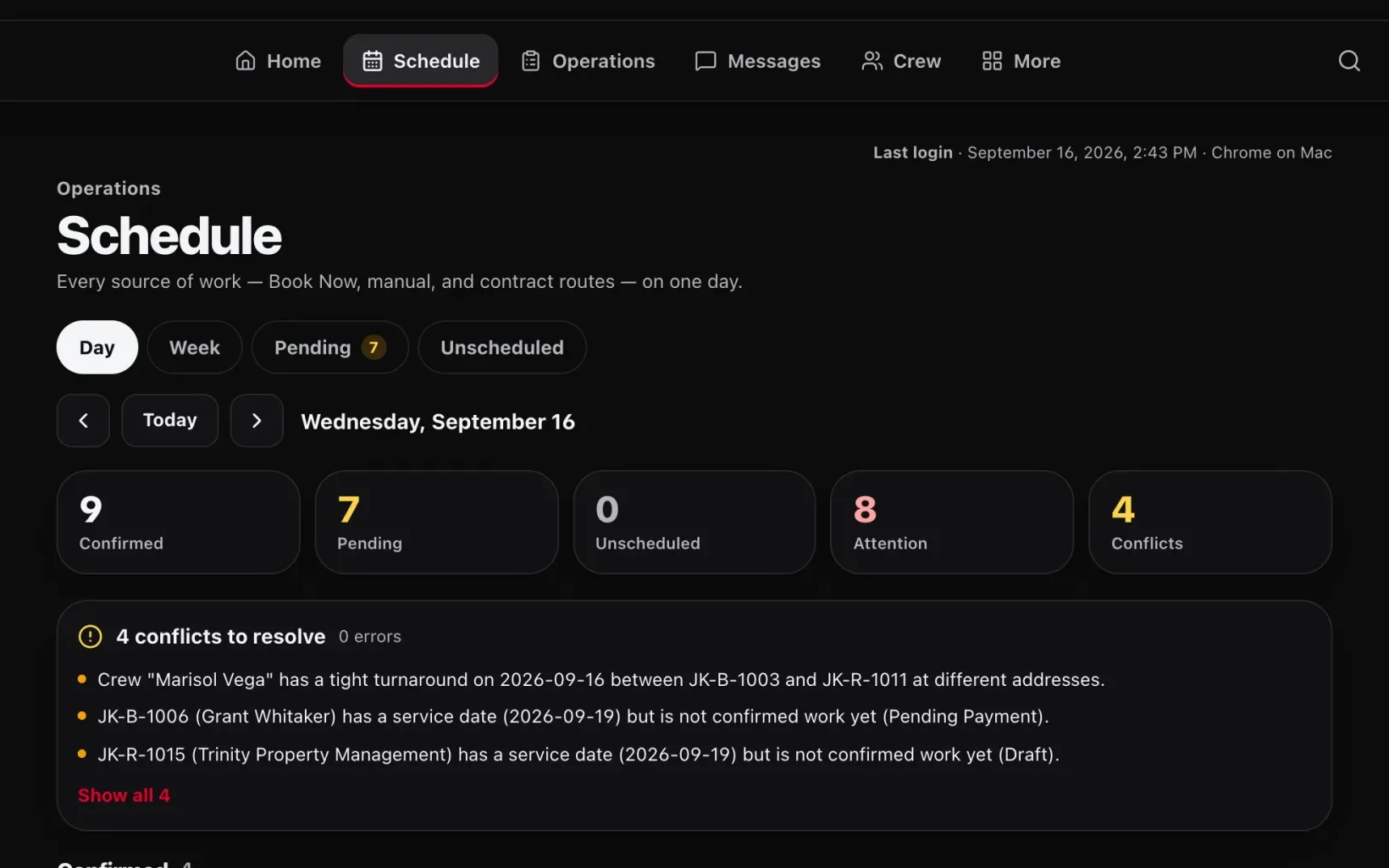
It catches double-bookings before a crew does.
Customer bookings, manual jobs and recurring contract routes share one calendar. Operion flags problems before the day goes wrong: the same driver at two addresses with too little time between them, a truck booked twice, or a job with no crew.
- Nine conflict checks, covering crew, vehicle and equipment double-bookings, travel time, missing crew or vehicle, and duplicate jobs
- A 60-minute travel buffer between jobs at different addresses
- Day, week, pending and unscheduled views of every source of work
Job profit
Know what every job made before the truck leaves.
Every route shows what the client pays, what each crew member earns and the profit in between. Rates are saved onto the job when it's created or assigned, so changing someone's rate later can't quietly rewrite past work.
- Money panel visible to admins only
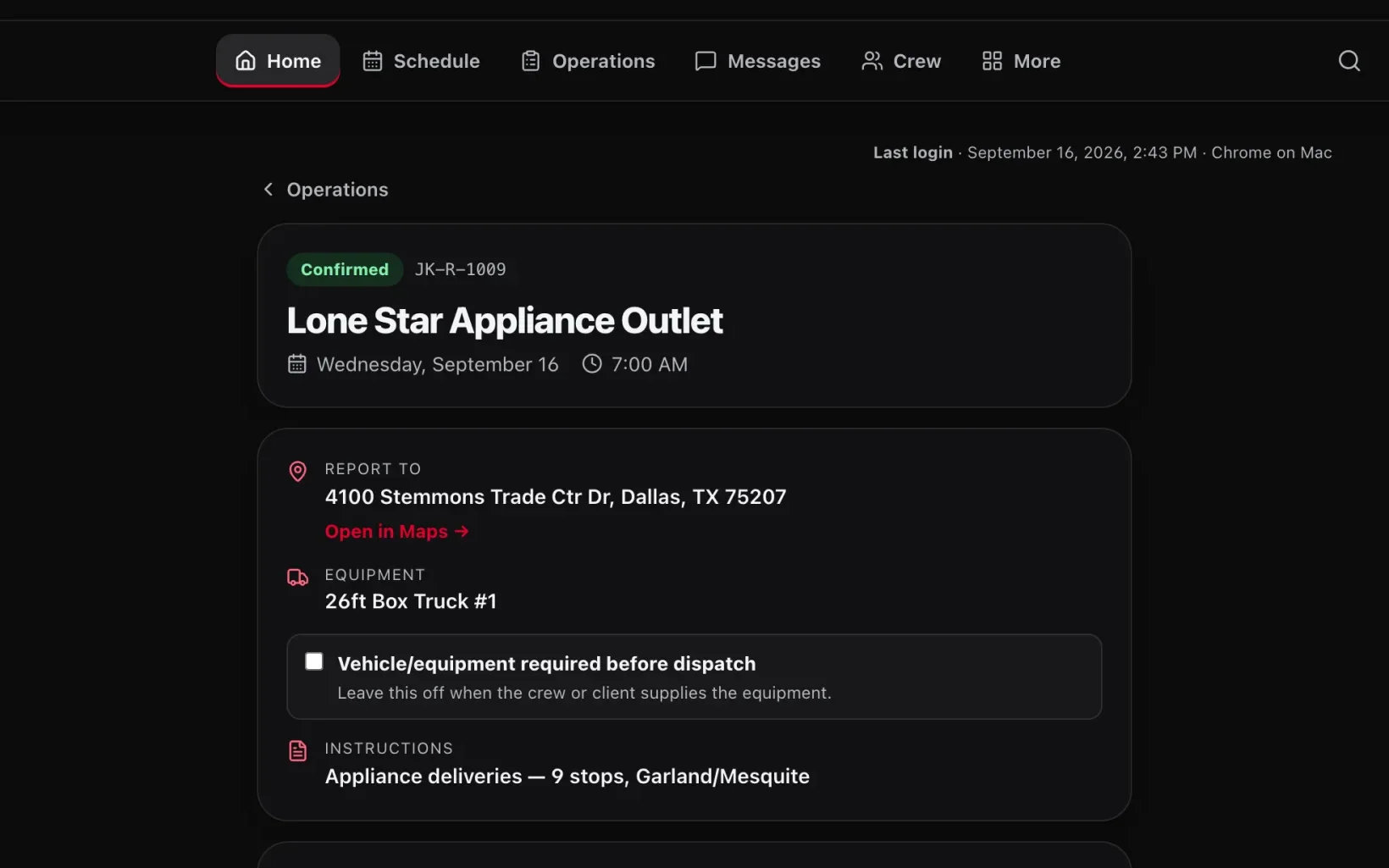
- A crew member's confirmation is tracked separately from whether the job is ready to dispatch
- Require a vehicle before dispatch, or leave that off when the client supplies the truck
Crew on mobile
Built for the phone in a driver's pocket.
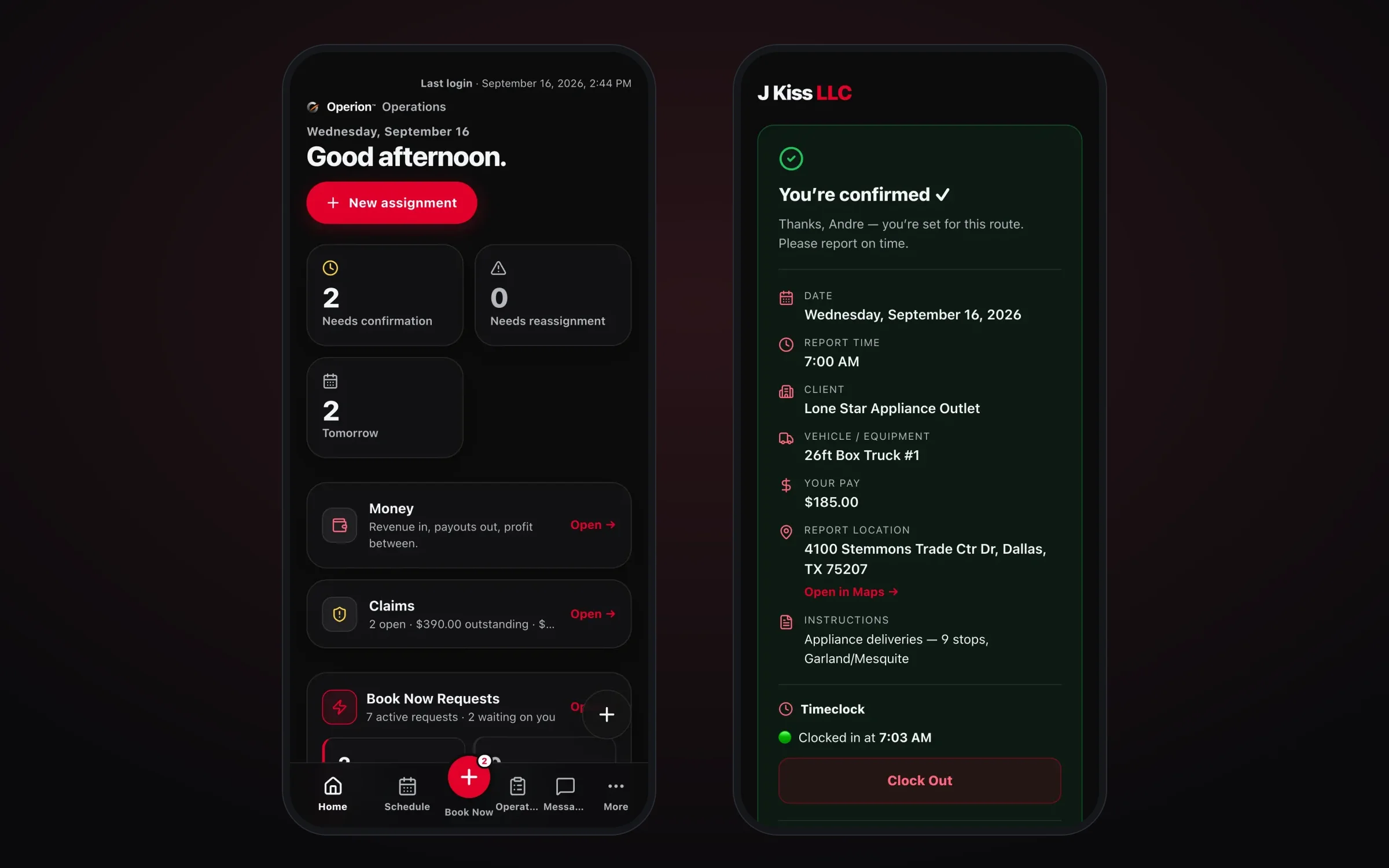
Nobody has to install an app. Each crew member gets a private link to their route with the report time, address, truck, instructions, their pay for the job and a time clock. The owner gets the whole system on a phone too, with Book Now one tap away.
- Each crew member confirms on their own and has their own pay line and time clock
- Open the report address straight in Maps
- The owner's phone view has a bottom tab bar with a raised Book Now button
Timesheets
Hours that come from the clock, not from memory.
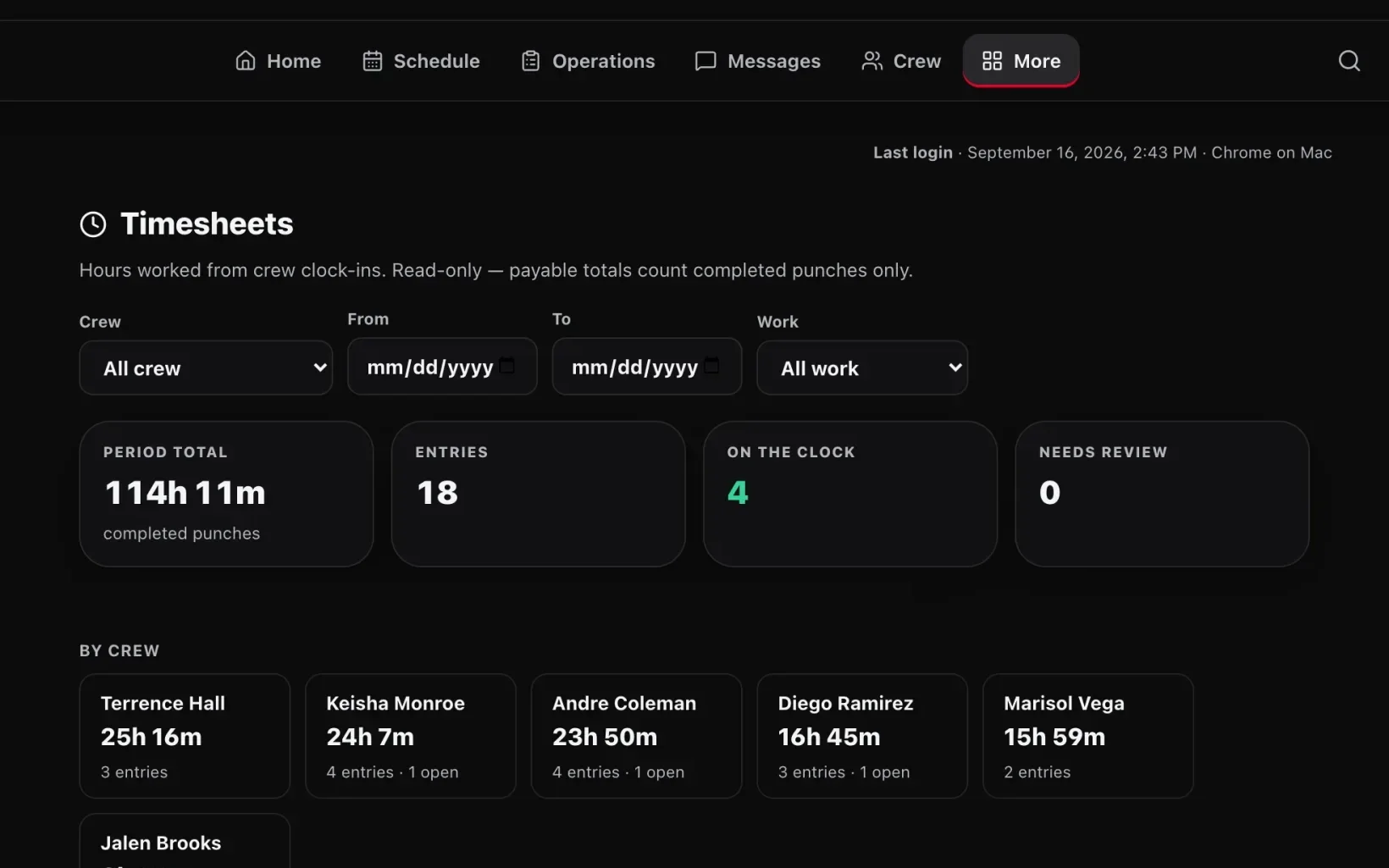
Clock-ins from the field roll up into totals for the pay period by crew member, with a live count of who's on the clock right now. Only a complete clock-in and clock-out pair counts toward hours, so a forgotten clock-out stays open instead of getting paid.
- Location is recorded at clock-in when the phone allows it, and crew who decline aren't locked out
- Filter by crew member, date range and type of work
- Admins can correct a punch time without touching the rest of the record
Payroll
Friday pay statements, built from work already recorded.
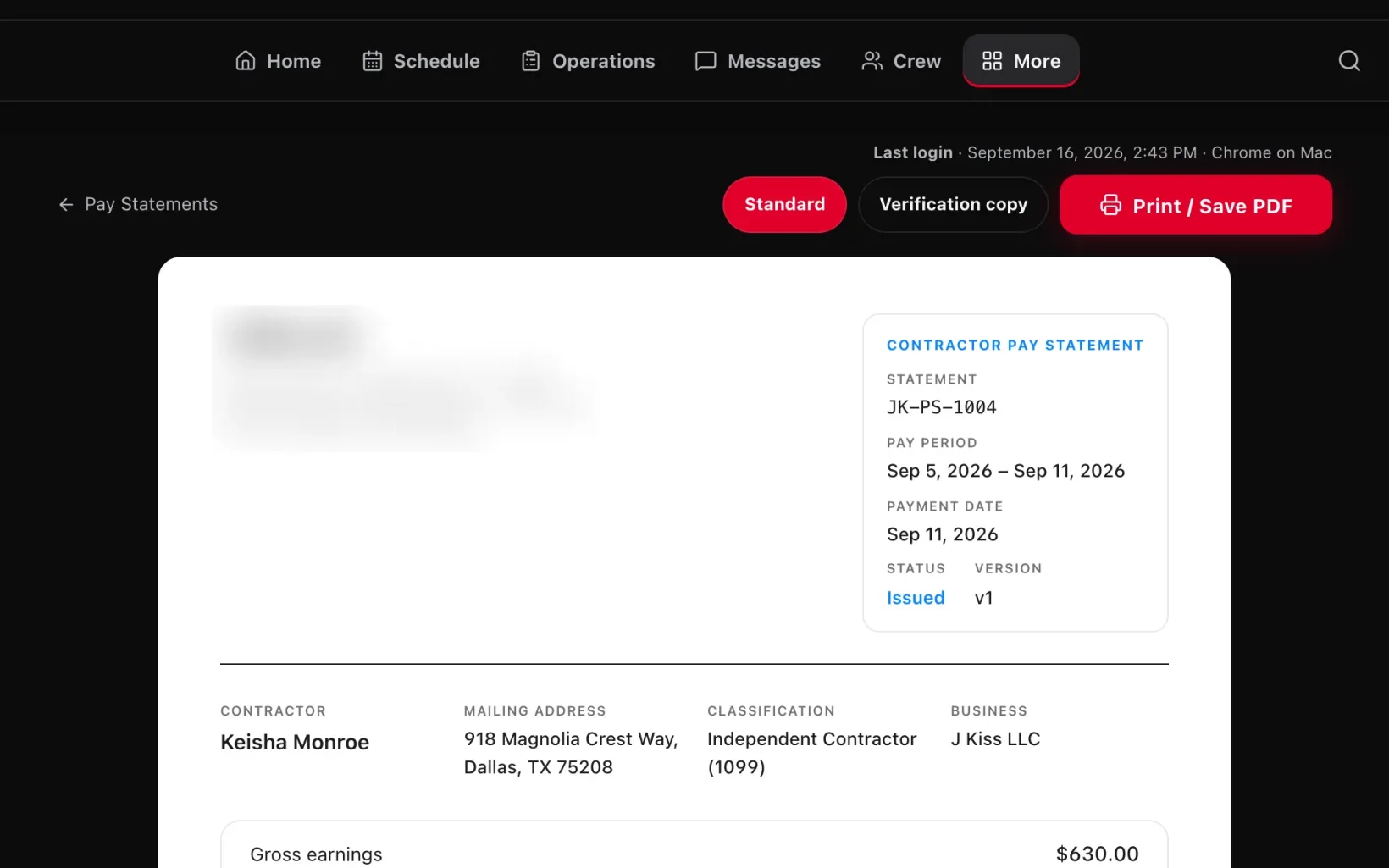
Operion builds each contractor's statement from the routes they completed, line by line, with their mailing address and 1099 classification. It's ready to print or save as a PDF. Nobody retypes it from a spreadsheet.
- A pay period can't be paid before the Friday after it ends
- Duplicate or overlapping pay periods are refused
- Addresses are saved onto the statement when it's issued, so the record never changes afterward
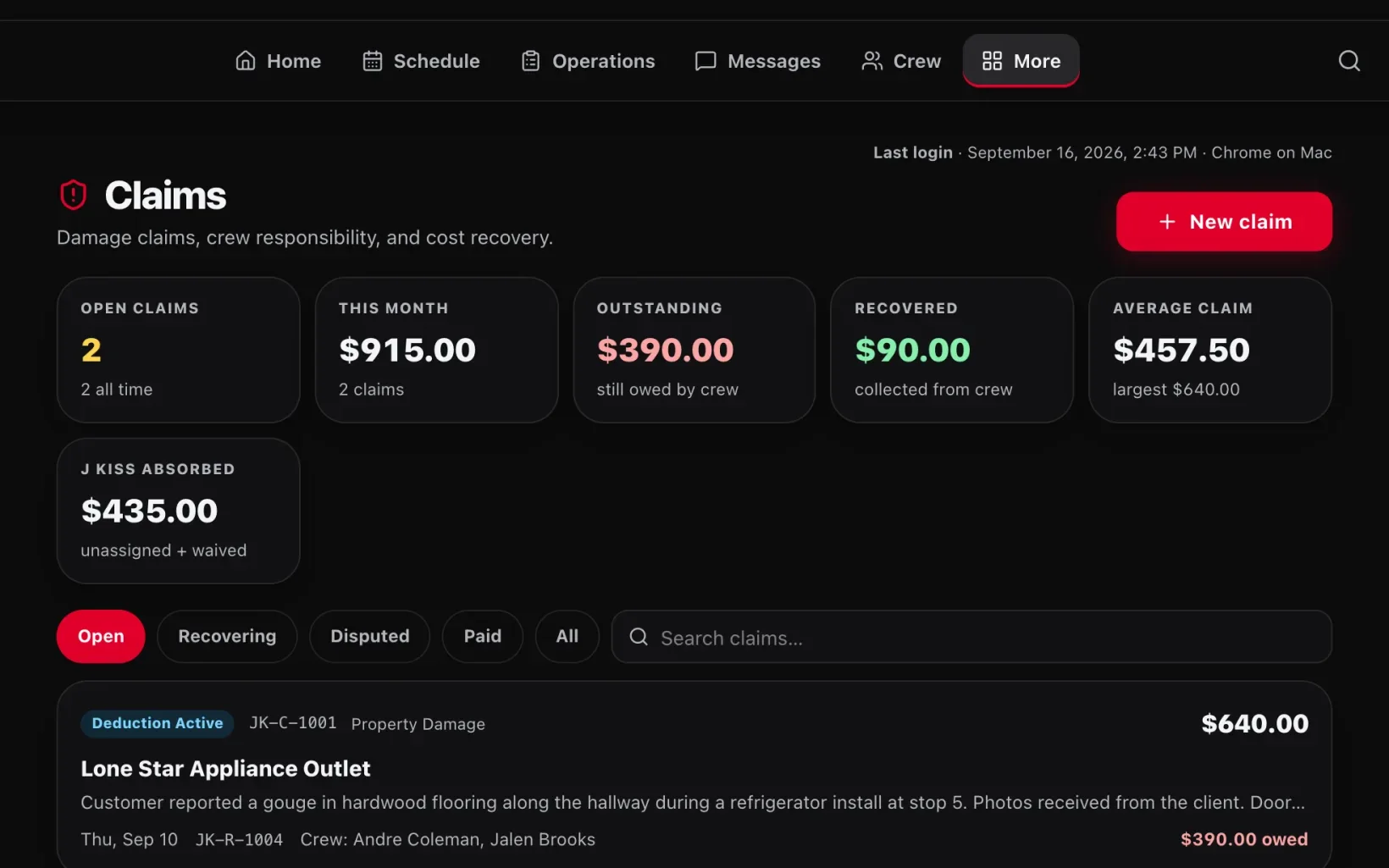
Claims
Damage and delay claims, tracked to the last dollar.
When a customer reports damage or a crew gets held up on site, the claim gets its own record: what happened, who was on the job, what's owed, what's been recovered and what the company is covering. Balances come down through weekly deductions that can never exceed what a contractor earned that week.
- Split a claim equally, by percent or by fixed dollar amounts
- An append-only ledger where corrections are new entries and history is never erased
- Waived balances are never counted as recovered money
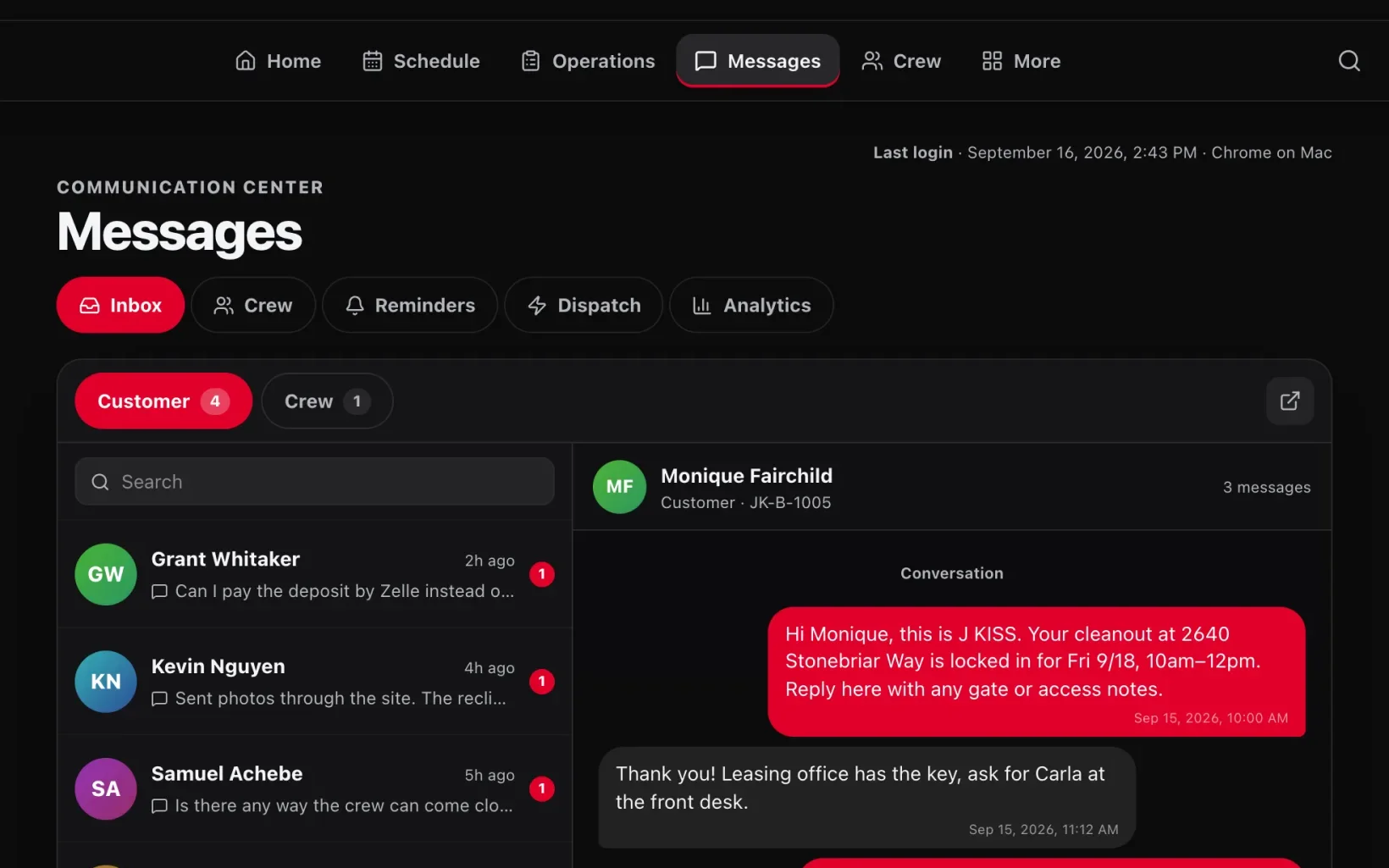
Communication
Every customer conversation lives with the job, not on someone's phone.
The Communication Center puts customer and crew conversations in one shared inbox, each linked to the booking it's about. When a customer replies, that booking's automatic reminders stop, so no one gets nudged in the middle of a conversation.
- Conversations organized by booking, phone number and crew member
- Each incoming message is processed exactly once, so a provider retry can't create duplicates
- Separate views for crew, reminders, dispatch and messaging analytics
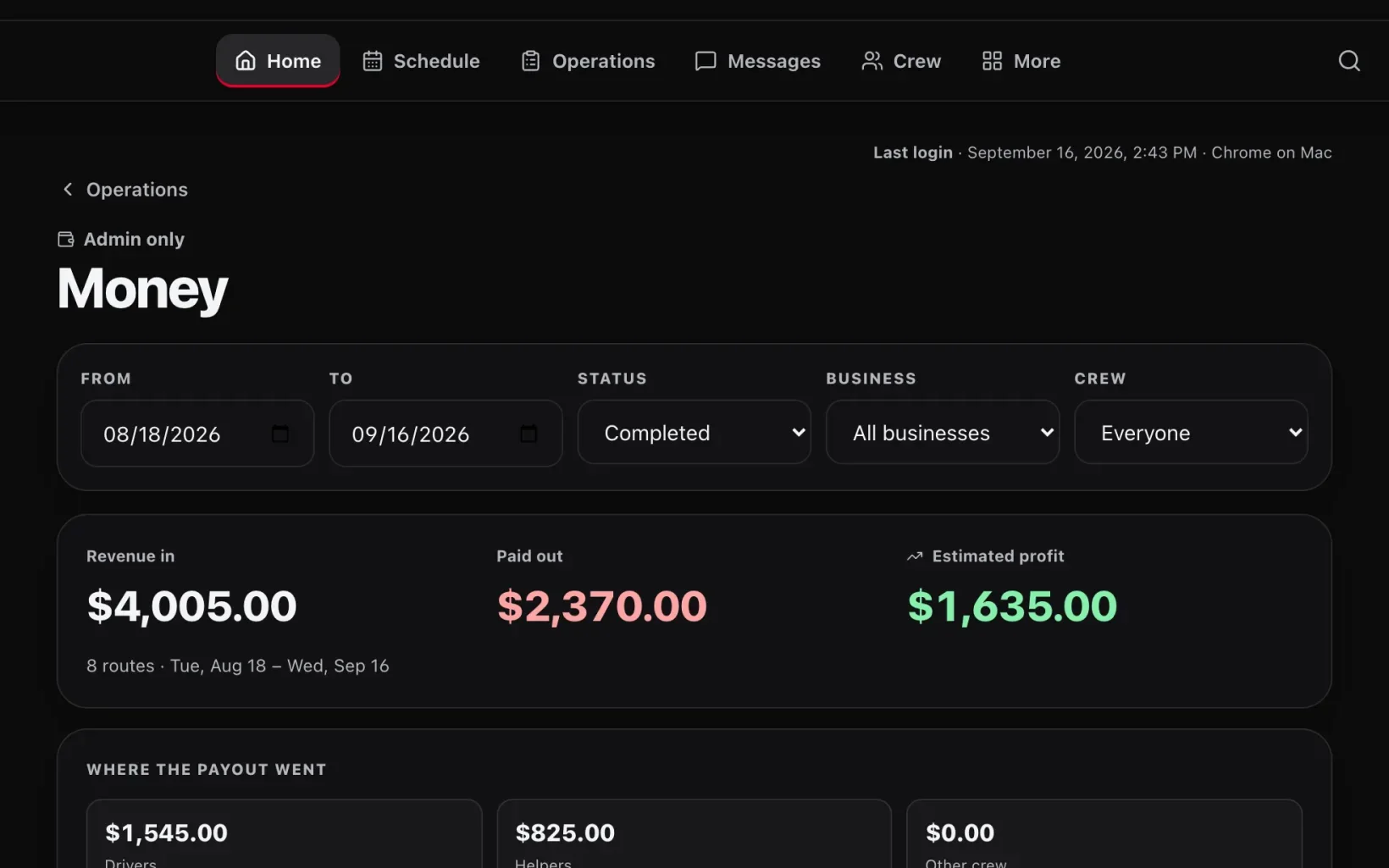
Money
Revenue, payouts and profit, by client and by crew member.
Pick a date range and see what came in, what went out to crew and what was left. Then break it down by client and by crew member to see which contracts actually pay.
- Filter by job status, client and crew member
- Payouts split between drivers, helpers and other crew
- Admin only, and the server strips pay data out before it reaches a manager
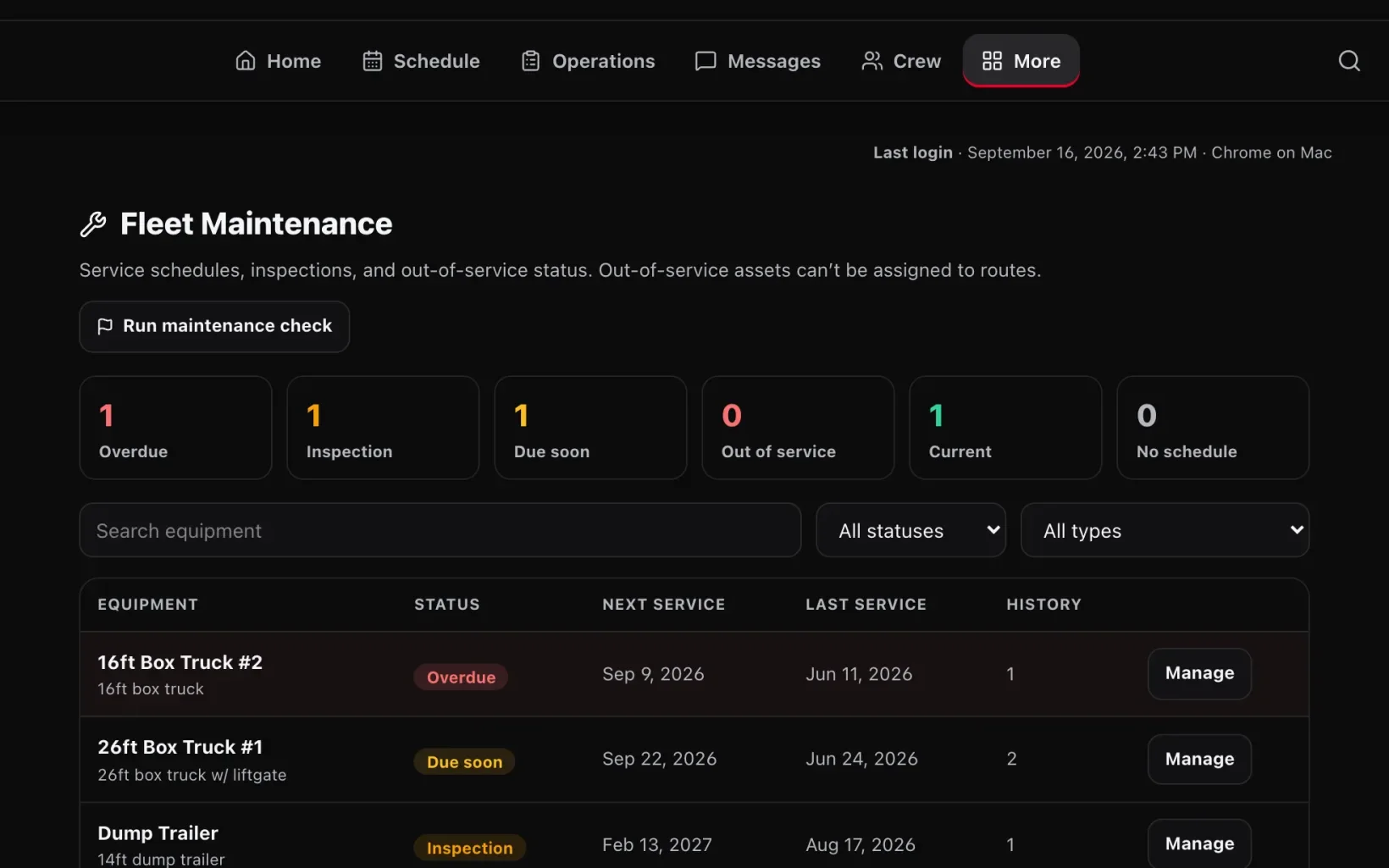
Fleet
Trucks get serviced before they break down, not after.
Every truck and trailer has a service schedule and inspection dates. Operion sorts the fleet into overdue, inspection due, due soon and current, so maintenance gets planned instead of discovered on the highway.
- Service status worked out from days, mileage and inspection dates
- Service history kept for every vehicle and piece of equipment
- A maintenance check across the whole fleet in one click
Access control
Everyone sees exactly what their job needs, and nothing more.
Admins, managers and crew get different access, built from 56 permissions defined in code and checked on every request. Hiding a button isn't the security: the server refuses a request the role isn't allowed to make.
- Admins run the business; managers run day-to-day operations; crew see only their own work
- Managers run operations without ever seeing pay or tax information
- A searchable permissions matrix anyone on the team can read
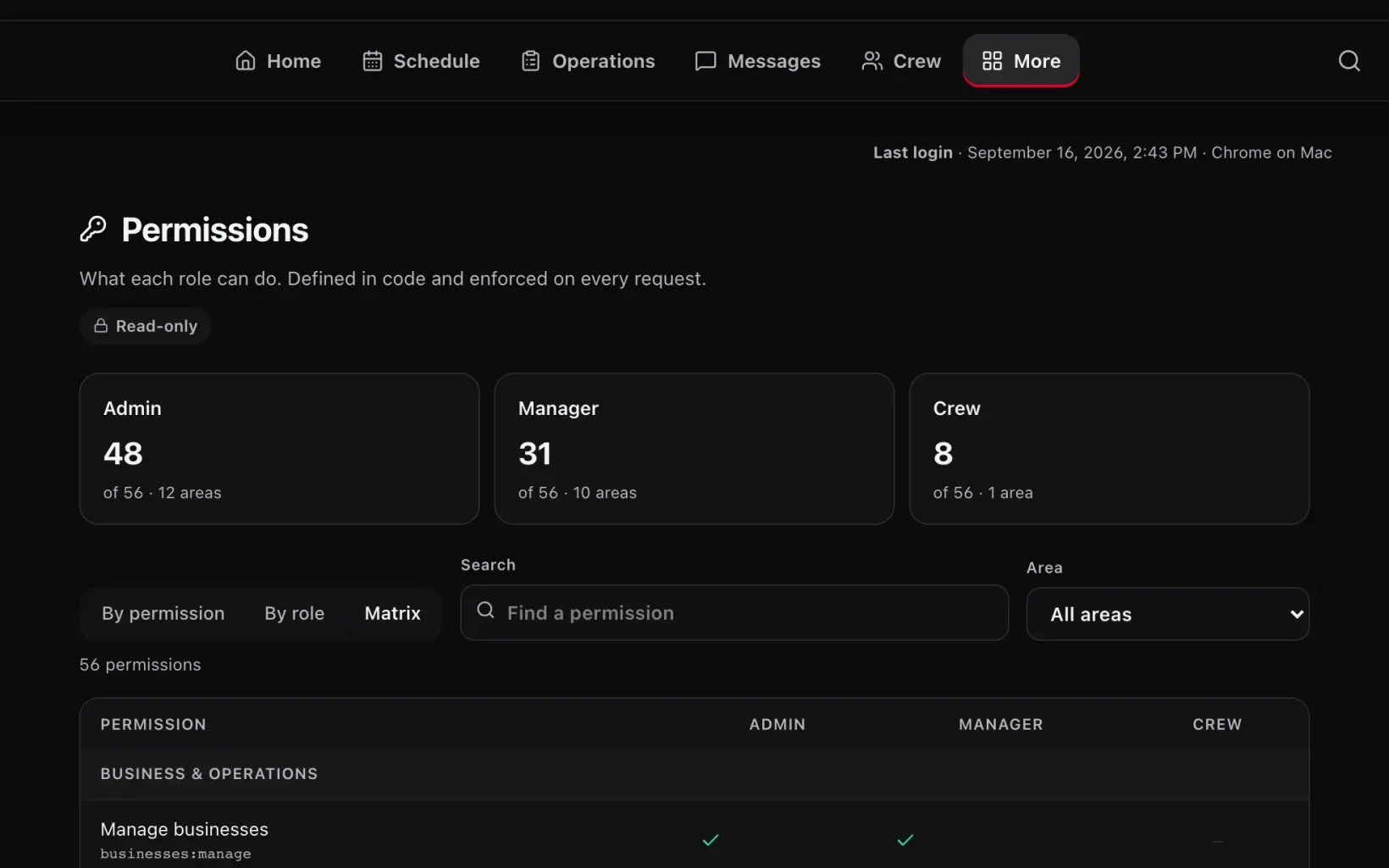
Screenshots show Operion's J Kiss configuration running on a local copy with invented customers, crew, client companies and amounts. Estimated price ranges reflect default settings rather than a company's live pricing.
The customer's experience
Identical to the individual companies — each tenant's customers see that company's own site.
What customers can do
- Everything the individual companies offer — quotes, booking, tracking, careers
The owner & staff experience
Each company gets the full operations system configured to its own services, pricing and branding.
What the business can do
- Dispatch, crew, payroll, claims and communications
- Role-based access across three permission tiers
- AI-assisted operations with cost caps and health checks
- Per-tenant branding, pricing and configuration
How it works
Architecture & integrations.
How the application, data, access controls, and connected services work together.
Designed for separate data
With multi-company mode on, every company's records live under their own key space and each company is configured rather than coded. Today the second company runs from its own copy of the code, kept in step by porting changes between the two.
Company differences are settings
Branding, service pricing and which integrations are switched on are company settings in the platform, so supporting a different business is mostly configuration rather than new code.
Isolation enforced in one place
Every stored record passes through a single company-scoping function. With multi-company mode on, a request that arrives without a company attached throws an error instead of writing somewhere shared, and a dedicated test catches any code that tries to go around it. The mode is tested but not yet enabled in production.
Permissions checked on the server
Role-based access across admin, manager and crew workflows is defined in code and checked on the server for every admin request.
Design decisions
The choices that shaped it — and why.
Rates are frozen onto the job
A client's price and each crew member's pay are copied onto the route when it is created or assigned. Changing someone's rate next month cannot quietly rewrite what last month's jobs paid.
Money records are append-only
Claim balances are never edited in place. Every charge, deduction, waiver and correction is a new ledger entry, so the history of who owes what always adds up — and a waived balance is never reported as recovered.
AI work has a spending ceiling
AI analysis can be given a daily spending cap per company. When the cap is reached, AI features pause until the next day while the rest of the system keeps running, and the health check reports a real outage instead of failing quietly and expensively.
How it was built
Development process
- 1Built the booking, dispatch and payments core inside J Kiss starting April 2026
- 2Generalized the J Kiss operations system into a tenantable platform, first branded OpsPilot in July 2026
- 3Built role-based access across three tiers and the communication center
- 4Added an AI provider seam so the language-model provider can be swapped
- 5Structured company configuration and role-based access around isolated tenants
Technical overview
Technology & implementation
Technology stack
- Next.js
- TypeScript
- Redis (Upstash)
- Vercel Blob
- Stripe
- Twilio
- Resend
- Anthropic Claude
Implementation scope
Architect and developer.
Related projects
You might also want to see

J Kiss LLC
Operations platform for a service business · Project
jkissllc.comA Dallas–Fort Worth hauling company that takes quotes, books jobs, dispatches crews, hires staff and runs payroll from one connected system rather than six disconnected ones.
Read the case study
Supercharged Enterprise
Operion implementation · first client · Client project
superchargedenterprise.comOperion’s first client: a property-preservation company running evictions, trash outs, junk removal and lawn care through the platform, configured with its own brand and pricing.
Read the case study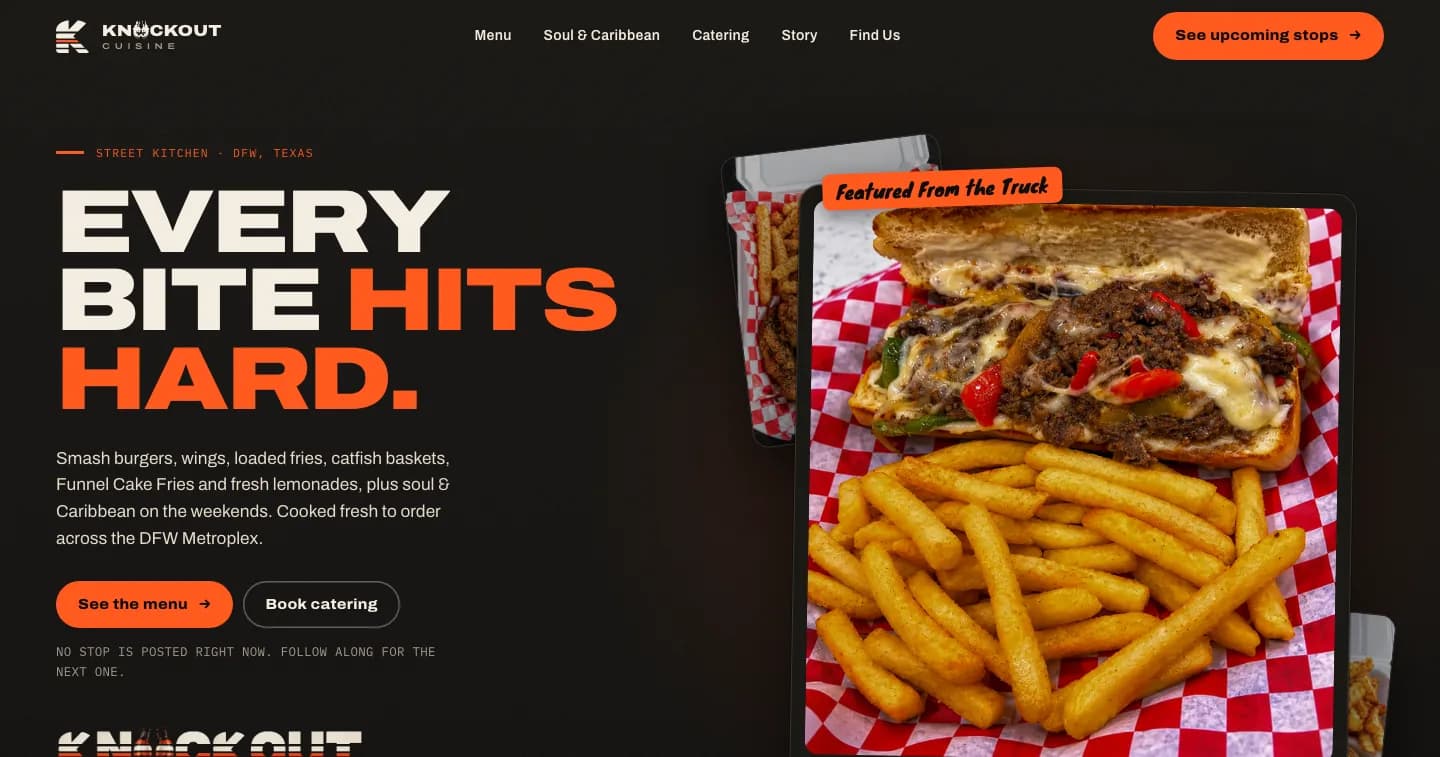
Knockout Cuisine
Food truck website, ordering & Operion Food Truck OS · Client project
knockoutcuisine.orgA DFW food truck gets one trustworthy home for its menu, stops and catering — run from Operion Food Truck OS, where the owner posts each stop, prices its menu, and opens preorders or live ordering when the truck is ready.
Read the case studyWant something like this for your business?
Tell me how your days go and what you'd like to stop doing by hand. I'll tell you honestly what would help.